cosyvoice 安装,多音色的控制 #190


No Assignees

Notifications
Due Date
No due date set.
Dependencies
No dependencies set.
Reference: temp-tickets/tickets#190
Reference in New Issue
Block a user
Delete Branch "%!s()"
Deleting a branch is permanent. Although the deleted branch may continue to exist for a short time before it actually gets removed, it CANNOT be undone in most cases. Continue?
1. 基础工具
sudo apt update && sudo apt install -y git build-essential sox libsox-dev ffmpeg unzip curl
2、安装conda
wget https://repo.anaconda.com/miniconda/Miniconda3-latest-Linux-x86_64.sh
chmod +x Miniconda3-latest-Linux-x86_64.sh
bash Miniconda3-latest-Linux-x86_64.sh
conda --version
3、创建隔离环境
conda create -n cosyvoice python=3.10 -y
会提示
conda tos accept --override-channels --channel https://repo.anaconda.com/pkgs/main
conda tos accept --override-channels --channel https://repo.anaconda.com/pkgs/r
conda activate cosyvoice
安装pynini
conda install -y -c conda-forge pynini==2.1.5
4、拉代码
git clone --recursive https://github.com/FunAudioLLM/CosyVoice.git
cd CosyVoice
sed -i 's|https://github.com|https://ghfast.top/https://github.com|g' .gitmodules
git submodule update --init --recursive
5、安装python依赖
pip config set global.index-url https://mirrors.aliyun.com/pypi/simple
python -m pip install -U pip setuptools wheel
python -m pip install -r requirements.txt
6、下载预训练模型
pip install modelscope
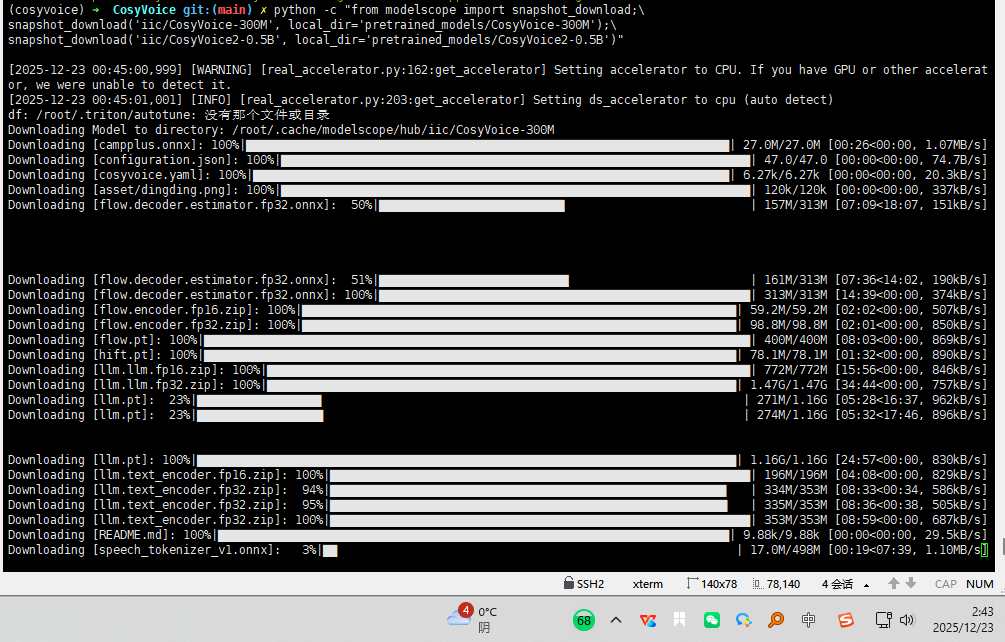
300M和0.5B 的 模型 共6G的模型
python -c "from modelscope import snapshot_download;\nsnapshot_download('iic/CosyVoice-300M', local_dir='pretrained_models/CosyVoice-300M');
snapshot_download('iic/CosyVoice2-0.5B', local_dir='pretrained_models/CosyVoice2-0.5B')"
300M的模型,约400M
python -c "from modelscope import snapshot_download;
snapshot_download('iic/CosyVoice-300M', local_dir='pretrained_models/CosyVoice-300M')"
7、试验
python -m cosyvoice.cli.cosyvoice synthesis --text "你好" --spk_id female1
查看spk_id
python -m cosyvoice.cli.cosyvoice list_spks
整体安装非常耗时!
查看服务器配置
系统版本
lsb_release -a
uname -r
cpu
lscpu
内存
free -h
显卡
nvidia-smi
lspci | grep -i vga
#千万不要下载0.5B
在 cosyvoice 环境里
pip install hyperpyyaml
pip install torch
pip install numpy
pip install onnxruntime
pip install whisper
pip install torchaudio
pip install inflect
pip install wetext
pip install regex
pip install transformers
pip install omegaconf
pip install scipy
pip install ttsfrd